Class scheduling software built for gymnastics gyms

A gymnastics floor is not one room with a whiteboard. It is beam, bars, vault, floor and a tumble strip shared by six groups at once, with coaches moving between them. Stick10 schedules it that way.

No credit card. Free during beta.

stick10.com/admin/schedule
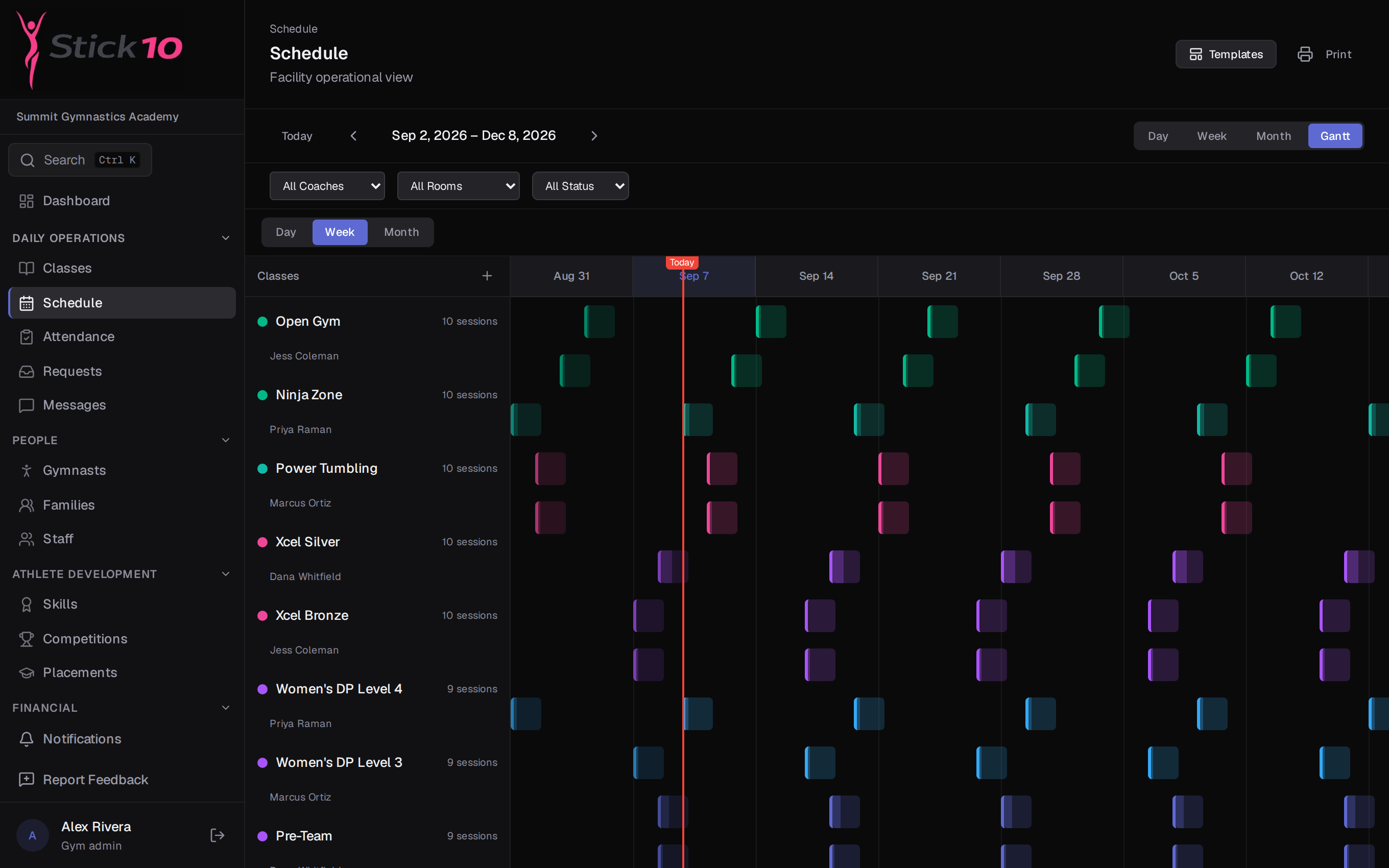
Stick10 schedule in Gantt view, one row per class and one column per week
Gantt view · one row per class, one column per week, today marked in red

Every class, coach and apparatus on one timeline

The day view is a timeline of your rooms and apparatus. Drag a rotation tile to move it, drag its edge to change the length, and see immediately when two groups want the same beam at the same time.

  • Day, week, month and Gantt views of the same schedule
  • Filter by coach, room or status when the floor is busy
  • Print the week for the front desk or the coaches’ room
Rotation templates you set up once

Build a season in one wizard: name it, pick the dates, choose the classes and lay out the rotations for each day. Stick10 saves the whole template in one step and generates every session for the run, so attendance and the parent portal are ready the same afternoon.

  • One template covers a full session or season
  • Rotation problems, like a coach in two places or an overfilled apparatus, are flagged before you save
  • Extend a season later and the new sessions are generated the same way
stick10.com/admin/schedule?view=week
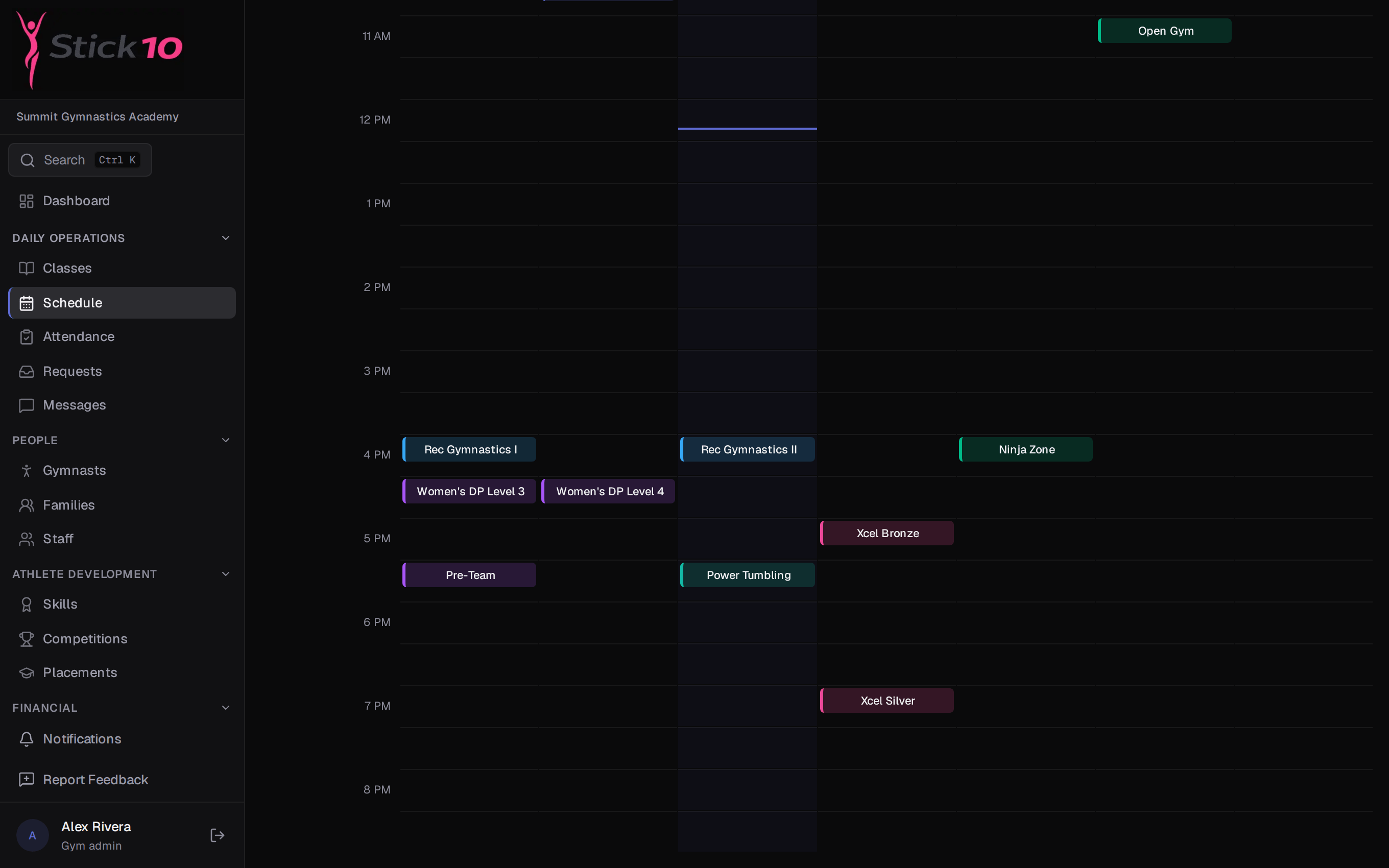
Stick10 schedule in week view with classes placed by time and day
Week view · the same classes by day and hour, filterable by coach, room or status

Classes that already know USAG

Toggle on the programs you run and Stick10 creates the classes: Women’s Development Program Levels 1 to 10, Xcel Bronze through Sapphire, Men’s Development Program, Trampoline and Tumbling, Rhythmic, plus recreational, preschool and specialty classes. Each comes with sensible ages, capacity and duration you can change.

  • Levels and programs come from USAG, not from a blank form
  • Price each class directly or through a price tier
  • Assign coaches per class and see them on every view

Enrollment, waitlists and requests

Capacity is enforced on every class. When a class is full, families join a waitlist and are promoted automatically when a spot opens. You choose per class category, and per class, whether parents can see it, view it only, or request a spot.

  • Waitlist with automatic promotion on drop
  • Requests queue for class spots and private lesson requests
  • Cancelling a session notifies every family in the class

Questions about scheduling

Can I schedule by apparatus, not just by room?+

Yes. Rooms and Areas in settings can be a room, an area like a tumbling strip, or a single apparatus like the beam area, each with its own capacity. Rotations are placed on those resources, so a beam conflict shows up as a beam conflict.

What happens when a coach is double-booked?+

The template wizard checks every rotation as you build it and flags a coach who would be in two places, or an apparatus with more gymnasts than it holds, before anything is saved. On the day view the same collision is visible on the timeline.

Do parents see schedule changes?+

Parents see their children’s classes and the week ahead in the portal. When a session is cancelled, every family in the class gets an in-app notification and an email.

Can I print the schedule?+

Yes. The Schedule page has a Print action for whichever view you are on.

Set up your gym this afternoon.

Create your facility, toggle on your programs, and you have a class roster before your coffee is cold.

Free during beta. No credit card required.