Switching gymnastics software without starting over

Switching software is the part every gym owner dreads: re-typing four hundred families, rebuilding classes, re-inviting parents. Stick10 is built so the first afternoon gets you most of the way there.

No credit card. Free during beta.

stick10.com/admin/dashboard
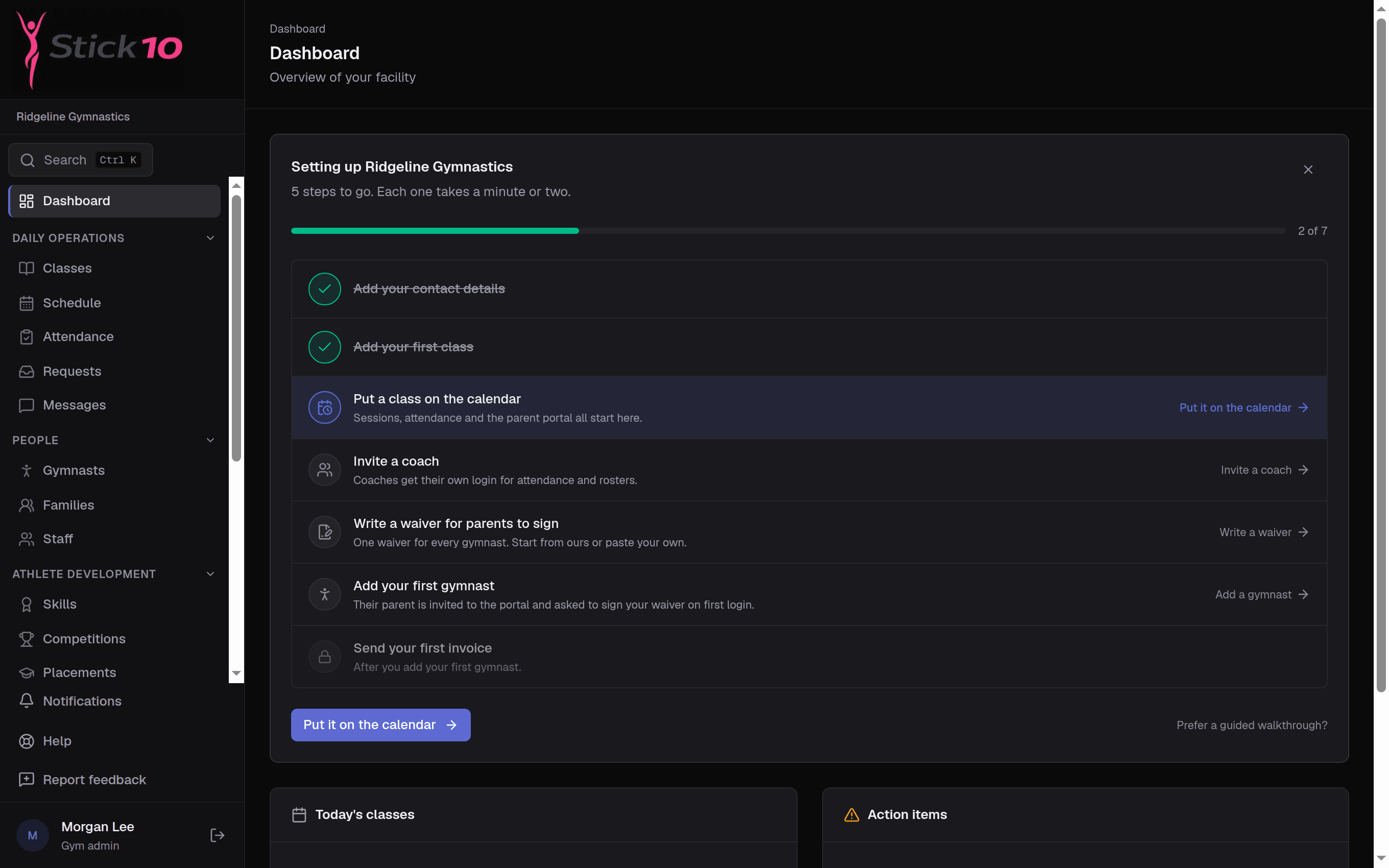
Stick10 dashboard for a new gym with the setup checklist showing completed and remaining steps
The setup checklist · seven steps, each linking to the page that finishes it

Bring your data with you

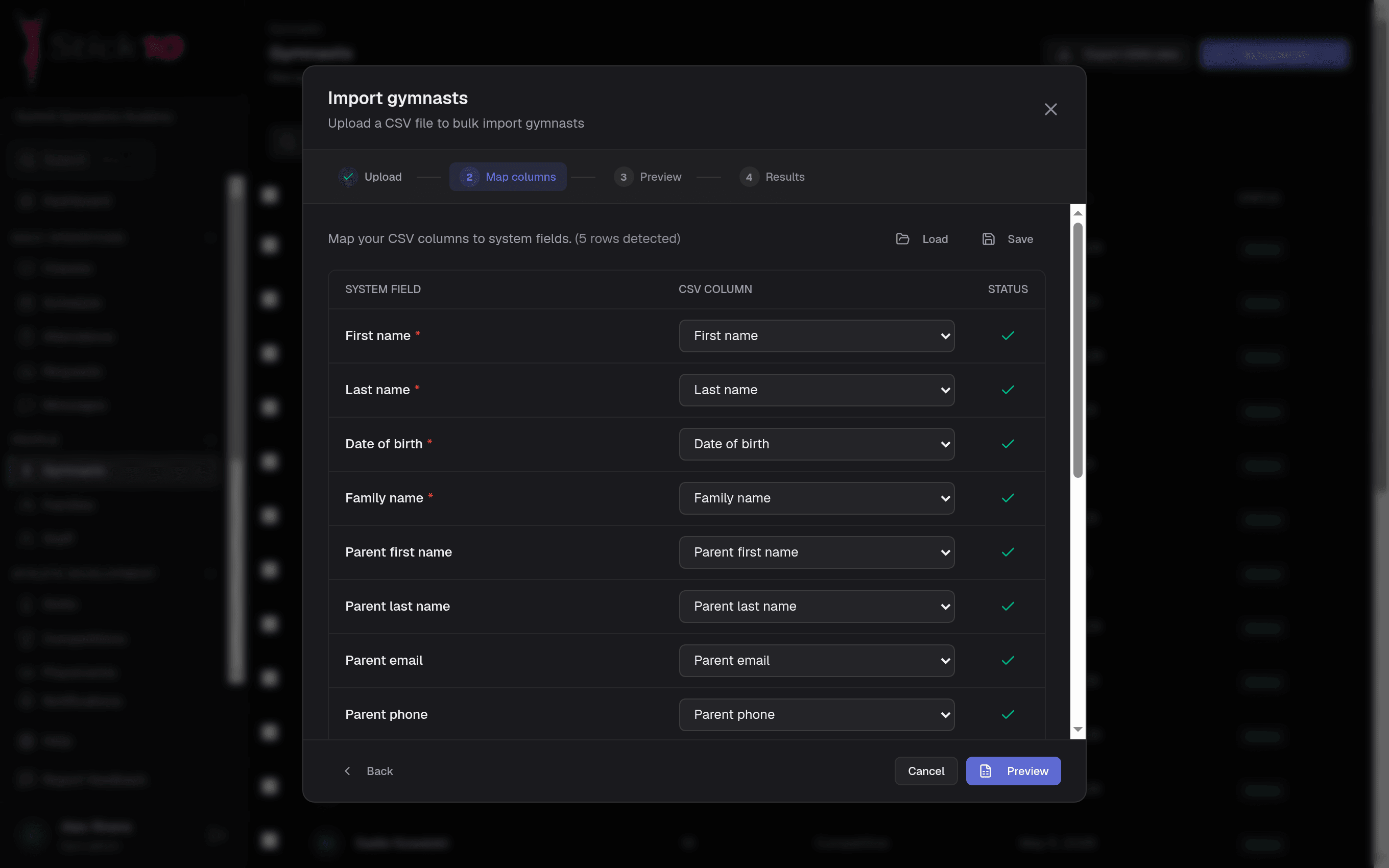
Export a spreadsheet from your current system and import it. Match your columns to Stick10’s fields once, preview what will be created, and import. Rows that cannot be imported are listed with the reason, so you fix those few instead of starting over.

  • Gymnasts, families, classes, staff, skills, events and products
  • Column matching you can save and reuse
  • Rows with problems listed, not silently dropped
A checklist that knows what is next

A new gym opens on a seven-step checklist: facility info, first class, first schedule, staff, waiver, first gymnast and first invoice. Each step links straight to the page and dialog that finishes it, and steps unlock in an order that works, so the waiver is ready before the first parent is invited.

  • Seven steps from empty gym to first invoice
  • Each step opens the right page
  • A guided setup wizard if you prefer one screen at a time
stick10.com/admin/students
Stick10 CSV import with spreadsheet columns matched to gymnast fields
CSV import · match your spreadsheet’s columns once, preview, then import

Try it with sample data first

Load a sample gym with classes, gymnasts and families from the checklist, click through everything, and remove it when you are ready to add your own.

  • Sample gym in one click
  • Every screen populated to explore
  • Removed in one click when you are done

Help while you get going

For the first two weeks Stick10 emails the owner the next setup step, with a link straight to it, and stops as soon as setup is done. Every page has a Help menu and a Feedback button that reaches the people who build Stick10.

  • Setup emails on days 1, 3, 7 and 14, until you are done
  • Help menu on every page
  • Feedback goes straight to the team

Questions about switching to Stick10

We use iClassPro or Jackrabbit today. Can we switch?+

Yes. Export your gymnasts, families and classes to CSV from your current system and import them into Stick10. Most gyms have their core data across the same afternoon.

Do parents have to be invited one at a time?+

No. Once families are in, invite every parent to the portal at once from the families list, and see who has logged in.

Can I run both systems for a while?+

Yes. Stick10 is free during the beta, so you can set it up alongside your current system and switch when you are ready.

Can I get my data out again?+

Yes. Your data is yours. Reports export to CSV, and we will send you a full export of your gym’s data whenever you ask.

Set up your gym this afternoon.

Create your facility, toggle on your programs, and you have a class roster before your coffee is cold.

Free during beta. No credit card required.